


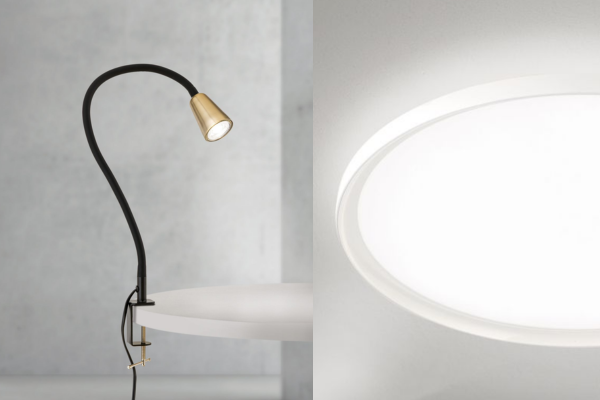
What is often underestimated is that few factors influence concentration, productivity, and well-being as much as the lighting in the workplace. Those who work in their employer’s office typically benefit from professionally designed lighting that meets ergonomic standards. In the home office, however, many people make do with the existing room lighting—with noticeable consequences for their eyes, neck, and performance.
In this article, you’ll learn what really matters when it comes to lighting in the home office, which mistakes are made most frequently, and how you can use the right combination of daylight, general lighting, and task lighting to create a workspace that supports productive work rather than hindering it.
Why Lighting Is So Important in the Home Office
Light is much more than just a tool for seeing. Through specialized receptors in the eye, it directly influences our internal clock, our hormonal balance, and thus also our alertness, mood, and ability to concentrate. Bright, cool light in the morning signals to the body that it’s time to be active and supports productivity, while warm, subdued light in the evening promotes the release of the sleep hormone melatonin and prepares the body for relaxation.
When working from home, many people spend significantly more time in front of a screen than they did in a traditional office setting—compounded by video conferences, personal screen time in the evening, and often less natural light due to the lack of outdoor lunch breaks. Poorly lit workspaces further exacerbate this strain: burning eyes, headaches, neck tension caused by unconscious poor posture, and declining concentration as the day progresses are typical consequences of inadequate lighting.
The good news: With a few targeted measures, the lighting situation in a home office can be significantly improved—often with minimal effort and without major structural changes.
The Three Levels of Home Office Lighting
A common misconception is the assumption that a single, as bright as possible light source is sufficient for the desk. In fact, good lighting always works through the interplay of several levels that complement each other:
1. Daylight as the natural and most valuable light source, which most strongly supports circadian rhythm and well-being.
2. General lighting (ambient light), which evenly illuminates the entire room and avoids harsh contrasts.
3. Task lighting (accent lighting), which is directed specifically at the work surface and provides sufficient brightness where work is actually being done.
It is only the interplay of these three levels that creates a pleasant, eye-friendly, and productivity-enhancing lighting environment—not a single, particularly bright lamp.
Making the Most of Daylight
No artificial light source can fully replace daylight. It changes in brightness and color temperature throughout the day, thereby providing exactly the signals our biological rhythm needs. If possible, you should position your desk so that as much natural light as possible falls on your workspace.
Proper orientation is key: The screen should not be positioned directly in front of or with your back to the window. If the monitor is positioned with your back to the window, distracting reflections and glare will appear on the screen. Conversely, if you sit with your back to the room and your face toward the window, the incoming light will directly dazzle your eyes. The ideal orientation is to the side, with daylight entering from the left or right—depending on how additional light sources are positioned.
On dark days or in rooms with few windows, daylight alone is often insufficient. In such cases, it makes sense to switch to artificial lighting early on, rather than continuing to work in semi-darkness as twilight sets in—a common but avoidable mistake that puts unnecessary strain on the eyes.
Proper Basic Lighting in the Home Office
In addition to the actual workspace, the rest of the room also needs sufficient light. A common mistake is having a brightly lit work surface in an otherwise dark room. This high contrast forces the eyes to constantly readjust when shifting focus between the screen and the room—which is tiring and straining over time.
For general lighting, ceiling lights, uplights, or several smaller light sources such as floor lamps are suitable, as they illuminate the room evenly. It’s also important here to avoid direct glare—for example, by using lights with diffuser shades, indirect light emission, or light directed toward the ceiling, from where it is gently reflected.
Task Lighting: The Desk Lamp as a Central Element
The desk lamp is the most important single element of home office lighting. It provides sufficient brightness exactly where you’re reading, writing, or working on a laptop, and can be flexibly adjusted for different tasks and times of day.
When choosing a good desk lamp, it’s worth considering the following criteria:
- Adjustability: A swivel arm and a tiltable lamp head allow you to direct the light exactly where it’s needed.
- Dimmability: The ability to adjust the brightness continuously is important for adapting to changing lighting conditions throughout the day.
- Adjustable color temperature: Some models allow you to switch between neutral white and warm white light—handy for transitioning from focused work to more relaxing tasks in the evening.
- Glare-free: Proper shielding of the light source prevents you from looking directly into a bright LED.
- Placement: Right-handed people should position the lamp on the left, and left-handed people on the right, to avoid distracting shadows cast by their own hand on the desk.
The Right Light Color Depending on Activity and Time of Day
The color temperature of light is measured in Kelvin (K) and significantly influences whether light has a stimulating or calming effect. Low Kelvin values correspond to warm, cozy light, while high values correspond to cool, stimulating light. For the home office, it’s worth consciously adjusting the light color to suit your activity and the time of day.
Time of Day / Activity Recommended Light Color Effect
Morning, focused work Neutral white (4,000–5,000 K) Promotes alertness and concentration
Video conferences Neutral white (4,000 K), glare-free Ensures a natural, well-lit video appearance
Afternoon, routine tasks Neutral white to warm white (3,500–4,000 K) Balanced alertness without overstimulation
Late afternoon / early evening Warm white (3,000 K) Supports gradual relaxation
After work in the home office Warm white (2,700–3,000 K) Reduces the stimulating effect, promotes calm
If you have dimmable lights with adjustable color temperature, you can replicate this progression throughout the day without having to switch out multiple lights. This not only supports productivity during work hours but also makes it easier to mentally wind down at the end of the day—an aspect that is particularly important when working from home, since work and living spaces often blend seamlessly into one another.
Avoiding Glare and Reflections
Glare is one of the most common—yet easiest to avoid—causes of eye strain when working from home. It occurs when light shines directly into the eyes or reflects off shiny surfaces such as computer screens.
The following measures help effectively reduce glare:
- Choose lights with anti-glare shields, diffuser panels, or indirect light output.
- Do not position the screen directly opposite a window or a bright light source.
- Adjust desk lamps so that the light falls on the work surface, not into your eyes.
- For very bright, glossy desk surfaces, use a matte mat if necessary to reduce reflections.
- Use curtains or blinds to soften strong, side-entrant sunlight in the afternoon.
Which Type of Light Fixture Is Best for Which Home Office?
Not every home office has the same spatial conditions—and the appropriate lighting solution can vary accordingly. A small guest room used as a work corner requires a different lighting concept than a spacious, separate home office or an open living-work area. The following overview shows which types of light fixtures are particularly suitable for which situations.
Home Office Situation Recommended Lighting Types Why It Makes Sense
Small desk in the corner Desk lamp + small floor lamp Space-saving, yet provides two levels of light
Separate home office Ceiling light or cove light + desk lamp Even ambient brightness throughout the entire room
Open-concept living-work area Floor lamp with uplight and downlight + table lamp Visually separates the work and living zones without structural changes
Home office with little natural light Daylight lamp (high luminous intensity, 5,000–6,500 K) + warm white supplementary light in the evening Compensates for lack of natural light, promotes alertness
Workstation for video conferences: Ring light or panel light positioned in front of the face. Provides even, flattering illumination without harsh shadows
Especially for people with limited natural light in their home office—such as in apartments with small windows or an unfavorable orientation—a so-called daylight lamp can be a useful addition. These lights provide particularly bright, cool light with high luminous intensity and can help promote alertness during the day, especially in the darker months of the year. It’s also important to note here that a daylight lamp is no substitute for real outdoor daylight, but it can be usefully employed as a supplement indoors.
For people who regularly participate in video conferences, it’s also worth paying attention to the lighting of their own face. If the only light source is positioned above or behind your head, unflattering shadows will form on your face, which will be visible to the people you’re talking to on screen. A small ring light or an LED panel positioned in front of your face ensures even, professional lighting—a detail that’s often overlooked in many home office guides but is certainly relevant to your professional appearance.
Smart Lighting in the Home Office
More and more people working from home are turning to smart lighting that can be controlled via an app, voice assistant, or timer. The advantage is obvious: brightness and color temperature can be automatically adjusted to the time of day without the need for manual intervention. A desk lamp programmed to emit neutral-white light in the morning, which automatically shifts to warm white in the late afternoon, supports your natural rhythm without requiring any extra effort.
Lighting scenes can also be helpful in your daily work routine: one for focused work, one for video conferences, and one for the end of the workday—all accessible at the touch of a button or via voice command. If you don’t yet own smart lights, you can often achieve a similar effect with simple, dimmable LED bulbs and a timer—smart systems are a convenient option, but not an absolute requirement for good home office lighting.
Common Mistakes in Home Office Lighting
Many lighting problems in the home office aren’t caused by a lack of light sources, but by using them incorrectly. Among the most common mistakes are:
Using only a single light source. If you rely exclusively on the ceiling light or exclusively on the desk lamp, you risk either excessive contrast or insufficient illumination of your workspace.
Light that’s too cool in the evening. Working late into the evening under cool-white, stimulating light unconsciously makes it harder to wind down and fall asleep afterward.
Incorrect positioning of the desk lamp. A lamp that shines on your writing hand from the “wrong” side creates distracting shadows right on the work surface.
Screen positioned with your back to the window. This obvious but unfavorable setup almost inevitably leads to reflections and glare while you’re working.
Turning on artificial light too late. If additional light isn’t turned on in time as dusk sets in, many people unknowingly work in semi-darkness—a significant strain on the eyes.
Additional Tips for an Eye-Friendly Home Office
In addition to lighting alone, there are several supplementary measures that, when combined with good lighting, help reduce eye strain in the home office:
- Take regular breaks from the screen and consciously look into the distance to relax the eye muscles.
- Adjust the screen brightness to match the room lighting so that there isn’t too much contrast between the screen and the surroundings.
- Get plenty of natural light even outside of work hours, for example by taking short walks during your lunch break, to support your natural light rhythm.
- Choose light sources with a high color rendering index (CRI)—ideally over 80—since these reproduce colors more naturally and are less straining on the eyes.
- Flicker-free LED lights are preferable, as even minimal flickering—which is often perceived unconsciously—can lead to headaches and fatigue over time.
Frequently Asked Questions About Home Office Lighting
How many lux does a home office desk need? For computer work, at least 500 lux on the work surface is generally recommended. For tasks that place particularly high demands on visual precision—such as reading small print on paper documents—750 to 1,000 lux may also be advisable. A dimmable desk lamp allows you to flexibly adjust the brightness depending on the task.
What light color is best for the eyes? There isn’t a single “best” light color for the entire day. Neutral-white light (approx. 4,000 Kelvin) is well-suited for focused work in the morning and early afternoon, while warm-white light (2,700 to 3,000 Kelvin) relieves eye strain in the evening and helps with the transition to the end of the workday.
Is a single ceiling light enough? Generally not. A single ceiling light often casts harsh shadows on the work surface and rarely allows for precise alignment with the desk. A more practical solution is a combination of general lighting and an additional, flexibly positionable desk lamp.
Is a daylight lamp worth it for a home office? For workspaces with little natural light—such as rooms without direct window light or during the dark winter months—a daylight lamp can noticeably help maintain alertness during the day. However, it is no substitute for spending time outdoors regularly.
How can I identify glare-free lights when shopping? Look for lights with diffuser panels, satin-finished covers, or indirect light emission. Product descriptions with terms like “glare-reduced” or “glare-free,” as well as a low UGR (Unified Glare Rating) value, are good indicators of eye-friendly light.
Conclusion
Good lighting in a home office isn’t just a minor detail—it’s one of the most important prerequisites for focused, healthy work. What matters isn’t a single, particularly bright lamp, but rather the well-thought-out interplay of natural light, even general lighting, and flexibly adjustable task lighting. If you also pay attention to the right light color for the appropriate time of day, glare-free lighting, and thoughtful placement of your screen and lights, you’ll create a workspace that is easy on the eyes, supports concentration, and makes the transition between work and downtime easier.
At Orion Lighting, you’ll find a wide selection of desk lamps, floor lamps, and ceiling lights for every home office setup—from dimmable LED desk lamps with adjustable color temperature to glare-free floor lamps for perfect ambient lighting. Be inspired by our selection and find the right lighting for a productive and eye-friendly workday at home.


